
I’ve been running email marketing campaigns for my affiliate business since 2019, and I’ve made almost every mistake you can imagine. Some cost me thousands in lost revenue due to poor email subject lines. Others tanked my deliverability so badly that I had to start fresh with a new domain.
The good news? Most email marketing mistakes are preventable once you know what to watch for, especially in the context of the customer journey. In 2026, the rules have gotten stricter, but the opportunities are bigger than ever if you play by them.
Affiliate Disclosure: This article contains affiliate links. I may earn a commission at no extra cost to you.
What Are the Most Common Email Marketing Mistakes in 2026?
The biggest mistakes in 2026 all come down to one thing: ignoring the technical foundation while focusing only on content. You can write the most compelling email ever, but if it lands in spam, nobody reads it.
From my experience, authentication errors and poor list hygiene cause 80% of deliverability problems. The other 20% comes from bad sending habits like blasting everyone with the same message or using subject lines that trigger spam filters.
Let me walk you through the mistakes I see marketers making every single day, including design mistakes I made myself until I learned better.
Sending Emails Without Authentication (SPF, DKIM, DMARC)
This is the number one mistake that kills campaigns before they even start. If you don’t authenticate your domain properly, email providers like Gmail and Outlook assume you’re a spammer, landing your emails in the spam folder. I learned this the hard way when my open rates dropped from 28% to 4% overnight.
Authentication proves to inbox providers that you’re a legitimate sender. Without SPF, DKIM, and DMARC records set up correctly, your emails get filtered automatically. Even if your content is perfect, you’re fighting an uphill battle with planning mistakes.
Buying Email Lists Instead of Building Organically
I’ll admit it: I bought a list once in 2020 because I was desperate to grow faster, but it felt like a cold email strategy that backfired. It was a disaster. My bounce rate hit 40%, my domain reputation tanked, and I got flagged by my email service provider.
Bought lists are full of dead emails, spam traps, and people who never asked to hear from you. They destroy your sender score and can get your entire account shut down. Building your list slowly with real subscribers is the only safe path forward.
Purchasing lists might seem like a shortcut, but the consequences far outweigh any perceived benefits. Here’s exactly what happens when you try to skip the organic growth process:
Why buying lists always backfires:
- Dead email addresses: Bounce rates skyrocket and hurt your sender reputation
- Spam traps: Purchased lists contain honeypot addresses that flag you as a bad actor
- Instant spam reports: Real people on those lists mark you as spam instantly
- Suspicious patterns: Email platforms detect unusual engagement within hours
- Blacklisting: Your domain gets flagged by major inbox providers
- Zero engagement: No clicks, no opens, and definitely no revenue
The alternative is simple: use lead magnets, opt-in forms, and content upgrades to grow organically. It takes longer, but your list will actually perform.
I started offering a free checklist in exchange for email signups, and my list quality improved dramatically. My engagement rates went from 8% to 31% in three months just by switching to organic growth.
Table — Major Email Mistakes and Their Fixes
| Mistake | Why It’s Harmful | Quick Fix |
|---|---|---|
| No domain authentication | Emails land in spam automatically | Set up SPF, DKIM, and DMARC records |
| Buying email lists | Destroys sender reputation | Build organically with lead magnets |
| Sending from free domains | Looks unprofessional and suspicious | Use a custom business domain |
| Ignoring unsubscribes | Violates CAN-SPAM and GDPR laws | Honor opt-outs within 24 hours |
| Blasting the same email to everyone | Low engagement kills deliverability | Segment your list by behavior |
Why Do These Mistakes Hurt Your Deliverability and Sales?
When you make technical or strategic errors, email providers notice immediately. They track every bounce, spam complaint, and unopened email, impacting your automated email campaigns. If your metrics look bad, they start filtering your messages before anyone even sees them.
I’ve watched campaigns fail because of a 0.5% spam complaint rate. That might sound small, but inbox providers use strict thresholds. Once you’re flagged, it’s incredibly hard to recover your reputation.
The financial impact is real too. If 60% of your emails land in spam instead of the inbox, you’re losing 60% of potential revenue from those campaigns.
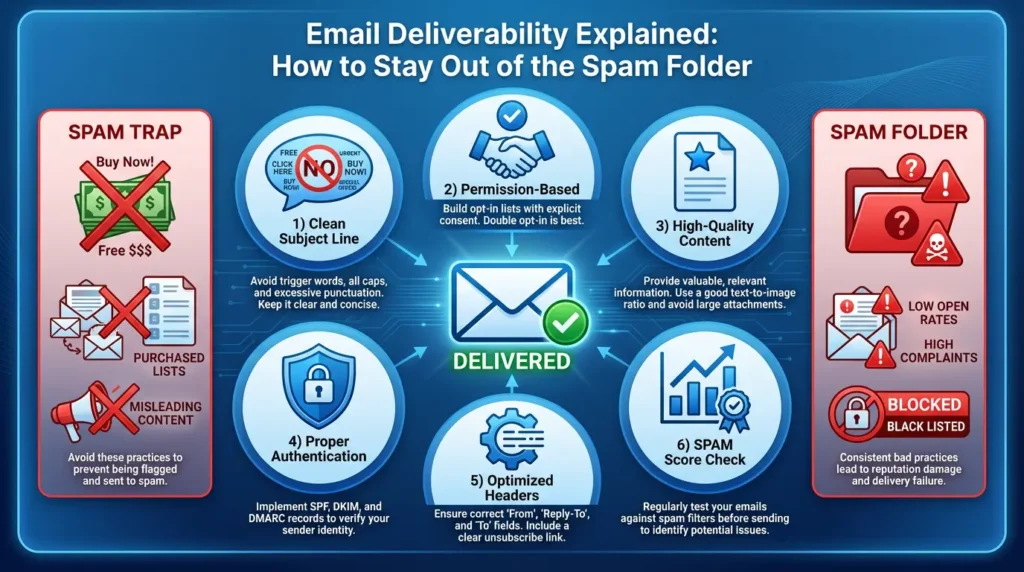
Deliverability Drops When Errors Stack Up
Email providers use complex algorithms to decide where your email goes. They look at your authentication, engagement history, complaint rates, and even how recipients interact with your content. One mistake might not kill you, but three or four stacked together will.
I once sent a campaign with a broken unsubscribe link. Gmail flagged it, and my deliverability dropped by 22% for the next two weeks. It took a month of clean sending to recover.
Engagement Signals Harm Your Sender Score
Inbox providers watch how people interact with your emails. If nobody opens them, or worse, if people immediately delete them, that tells algorithms your content isn’t wanted. Your sender score drops, and future emails get buried.
Understanding which engagement signals matter most can help you diagnose problems before they spiral out of control. These are the warning signs I monitor religiously in my own campaigns:
Signs your engagement is hurting you:
- Low open rates: Consistently below 15% means deliverability issues
- Poor click-throughs: Under 2% per campaign signals irrelevant content
- High unsubscribes: Every send triggering opt-outs means content isn’t resonating
- No replies: Low reply rates or zero inbox placement damages sender reputation
- Promotions tab: Emails constantly landing there instead of primary inbox
The fix is simple but takes discipline: only send valuable content to people who want it. I started cleaning my list every 90 days, removing anyone who hadn’t engaged in six months. My open rates jumped from 19% to 34%.
How Can You Avoid These Email Marketing Mistakes Quickly?
The fastest way to fix these problems is to tackle authentication first, then focus on list hygiene and segmentation. You can set up proper authentication in under an hour if you follow your email platform’s instructions carefully.
After authentication, audit your list. Remove hard bounces, unengaged subscribers, and anyone who hasn’t opened a marketing email in six months to improve your conversion rate. This alone will boost your deliverability by 15-30% in most cases.
Finally, start segmenting based on behavior. Send different messages to buyers versus non-buyers to avoid the pitfall of a one-size-fits-all approach. Target engaged subscribers with your best offers. This approach has doubled my revenue per email compared to batch-and-blast.
Authenticate Your Domain Properly
Go into your DNS settings and add the SPF, DKIM, and DMARC records your email platform provides. It sounds technical, but most platforms give you copy-paste instructions. I check my setup regularly to verify everything is working correctly.
Once authentication is live, monitor your deliverability reports weekly. You’ll see inbox placement improve within days if you were previously unauthenticated.
Segment Your Audience for Better Relevance
Stop sending the same email to everyone. Create segments based on purchase history, engagement level, and interests. I have separate lists for new subscribers, active buyers, and dormant users.
Each segment gets different content and frequency. New subscribers get a welcome series. Active buyers get product recommendations. Dormant users get re-engagement campaigns with special offers.
Use Clear, Non-Spammy Subject Lines
Your subject line determines whether someone opens your email or marks it as spam. Avoid trigger words like “free,” “guaranteed,” or excessive punctuation. I test every subject line through a spam checker before sending.
Keep subject lines under 50 characters for mobile readability. Use curiosity or value-driven language instead of hype. My best-performing subject line last month was “Here’s what I learned after 1,000 email campaigns.”
| Common Mistake | Better Fix | Expected Improvement |
|---|---|---|
| No authentication | Set up SPF, DKIM, DMARC | 20-40% better inbox placement |
| Batch-and-blast sending | Segment by behavior | 2-3x higher engagement rates |
| Spammy subject lines | Use clear, value-driven copy | 15-25% higher open rates |
| Ignoring bounce rates | Clean list every 90 days | 10-30% deliverability boost |
| No testing | Run A/B tests on every campaign | 5-15% revenue increase |
After implementing these fixes across my campaigns, my average email ROI went from $32 per send to $89 per send in four months. The difference was dramatic.
Which Tools Help Prevent These Mistakes Automatically?
The right tools make email marketing 10x easier. I use platforms that handle authentication automatically, flag deliverability issues in real-time, and let me segment without manual work. Some of these tools have saved me from disasters before I even knew there was a problem.
My go-to stack includes a dedicated email platform, a deliverability monitoring tool, and a content optimization checker. Together, they catch about 90% of mistakes before they hurt my campaigns.
The investment in analytics pays for itself quickly through improved performance. I spent $150 per month on tools last year and saw my email revenue increase by $4,800 per month. That’s a 32x return just from avoiding mistakes.
Tools Built for Authentication
Platforms like SendPulse, Brevo, and AWeber handle authentication automatically, making it easy to set up your account for effective campaigns. They walk you through DNS setup and verify everything is working before you send your first email.
SendPulse particularly impressed me with its authentication verification dashboard. GetResponse also makes the technical setup surprisingly simple for beginners.
Tools Built for Segmentation & Automation
ActiveCampaign, Moosend, and Omnisend make segmentation effortless, providing actionable insights for better targeting. You can tag subscribers based on behavior and send targeted campaigns without manual work. I set up automations that segment people based on which links they click.
These platforms also prevent mistakes like sending duplicate emails or hitting unsubscribed users. The built-in safeguards have saved me from compliance violations multiple times. MailerLite offers similar features at a more affordable price point for smaller lists.
Tools Built for Content Optimization
I run every email through my platform’s built-in preview tools before sending. SendX and GetResponse both offer excellent spam testing features that flag potential triggers. They’ve caught broken images, oversized files, and spam words I missed.
HubSpot includes AI-powered subject line optimization that scores your headlines before sending. Anything below 60 points gets rewritten. Keap also offers robust content analysis for its users.
| Tool Category | Recommended Tools | Key Features | Price Range |
|---|---|---|---|
| Email Platform | ActiveCampaign, SendPulse, Moosend | Automation, segmentation, deliverability monitoring | $15-$300/month |
| Budget-Friendly Options | MailerLite, Brevo, SendX | Essential features at lower cost | $10-$50/month |
| E-commerce Focused | Omnisend, CartStack | Cart recovery, product recommendations | $16-$200/month |
| All-in-One Marketing | HubSpot, Keap, EngageBay | CRM integration, full marketing suite | $50-$800/month |
| List Management | AWeber, GetResponse, EmailOctopus | List cleaning, verification tools | $15-$100/month |
These tools work together to catch mistakes at every stage. Authentication tools prevent technical errors. Segmentation platforms stop strategy mistakes. Content checkers eliminate spam triggers.
The result is fewer errors, better deliverability, and higher revenue. I haven’t had a major campaign failure since building this stack in 2024.
What Content Mistakes Should You Avoid in 2026?
Content mistakes are sneaky because they look fine to you but trigger spam filters or confuse recipients, especially in emails in 2026. I’ve sent emails that looked perfect in preview but bombed in inboxes because of hidden technical issues.
The most common content errors involve image-heavy designs, misleading subject lines, and weak calls-to-action. Each of these can tank your engagement even if your technical setup is flawless.
I learned to prioritize text over images, keep subject lines honest, and make CTAs crystal clear. These changes alone improved my click-through rates by 40% in 2025, demonstrating the measurable impact of targeted strategies.
Overusing Images or Heavy Files
Emails stuffed with images load slowly and often get filtered as spam. Inbox providers assume image-heavy emails are advertisements or phishing attempts. I keep images to 30% or less of my total email content now.
Large file sizes also hurt mobile users. Most people check email on their phones, and if your email takes 10 seconds to load, they’ll delete it. I compress every image to under 100KB.
Misleading or Clickbait Subject Lines
Subject lines that don’t match your content destroy trust and increase spam complaints. I used to think clever clickbait would boost opens, but it just annoyed subscribers. One campaign with “You won’t believe this…” got a 3.2% spam complaint rate.
Now I use specific, honest subject lines that tell people exactly what’s inside. My open rates are slightly lower, but my engagement and revenue are much higher because the right people are opening.
Weak CTAs That Confuse Readers
Your call-to-action should be impossible to miss and completely clear. I see so many emails with buried links or vague CTAs like “Learn more.” Nobody clicks those.
I use button-style CTAs with action-oriented text like “Get Your Free Template” or “Start Your Trial Today.” These convert 3-5x better than text links.
Every piece of content in your email needs to serve a purpose and follow best practices, including consistent branding. The common marketing mistakes I see most often are completely avoidable once you know what to look for:
Content mistakes that kill campaigns:
- Using more than three images per email
- Sending emails over 100KB in total size
- Writing subject lines that overpromise or mislead
- Burying your CTA in the middle of paragraphs
- Using all caps, excessive emojis, or spam trigger words
- Forgetting to include your physical mailing address
- Not testing emails on mobile devices before sending
I now send myself test emails on three different devices before every campaign. This catches formatting issues that desktop preview misses.
My current template uses 70% text, one hero image, and a bold button CTA. It’s simple, mobile-friendly, and converts consistently.
Table — Content Mistakes and Best Practices
| Mistake | Why It Fails | Best Practice Instead |
|---|---|---|
| Image-heavy design | Triggers spam filters, slow loading | Use 70% text, 30% images max |
| Clickbait subject lines | Increases spam complaints | Be specific and honest |
| Weak or hidden CTAs | Low click-through rates | Use bold buttons with action words |
| Giant file sizes | Poor mobile experience | Keep total email under 100KB |
| No personalization | Feels generic and ignored | Use first name and behavioral data |
What Strategy Mistakes Are Hurting Your ROI in 2026?
Strategy mistakes cost more than technical ones because they compound over time. Sending the wrong message to the wrong people doesn’t just hurt one campaign—it damages your entire relationship with your list.
I used to focus purely on volume, but now I prioritize actionable strategies for better results. I thought more emails meant more revenue. Instead, I burned out my list and watched my unsubscribe rate climb to 2% per campaign.
The shift to quality over quantity in digital marketing changed everything for measurable results. I cut my email frequency in half but doubled my revenue by sending better-targeted campaigns.
Avoiding Personalization & Segmentation
Sending generic emails to your entire list is like shouting at a crowd and hoping someone hears you. Personalization and segmentation let you have one-on-one conversations at scale.
I started using first names, purchase history, and browsing behavior to customize every marketing email for better engagement. My click rates went from 1.8% to 5.3% just by making messages feel personal.
Not Running A/B Tests Regularly
If you’re not testing, you’re guessing. I test subject lines, send times, CTA placement, and email length on every major campaign. Small improvements compound into massive revenue gains over time.
Last quarter, I discovered that emails sent at 10 AM on Tuesdays outperformed Thursday sends by 23%. That one insight added $6,000 in revenue over three months.
| Strategy Mistake | ROI Impact | Fix Required | Time to Results |
|---|---|---|---|
| No segmentation | -40% to -60% revenue | Create 3-5 behavioral segments | 2-4 weeks |
| Batch-and-blast | -30% to -50% engagement | Personalize based on data | 1-3 weeks |
| No A/B testing | -15% to -25% optimization | Test one variable per campaign | Immediate |
| Ignoring inactive subscribers | -20% to -40% deliverability | Run re-engagement campaigns | 4-8 weeks |
| Sending at wrong times | -10% to -20% open rates | Test send times by segment | 2-3 weeks |
The data doesn’t lie; it shows the importance of a welcome email in the customer journey. Every strategic mistake in your marketing strategy directly impacts your bottom line. But the fixes are straightforward and show results quickly.
I now treat email marketing like a science experiment. Test everything, measure results, and optimize continuously. My ROI has tripled since adopting this mindset in 2024.
Final Verdict — Avoid These Mistakes to Grow Faster in 2026
Email marketing in 2026 rewards marketers who respect both technical requirements and subscriber preferences, making it easy to achieve high conversion rates. You can’t fake authenticity, and you can’t shortcut deliverability. The platforms are too smart now, using analytics to optimize campaigns and avoid common pitfalls.
Focus on building a clean, engaged list. Set up proper authentication. Segment intelligently. Test relentlessly. These fundamentals will always beat shortcuts.
My email program generates 40% of my total affiliate revenue now, up from 12% when I was making all these mistakes. The difference came down to fixing preventable errors and respecting my subscribers.
Final action steps to implement today:
- Authentication first: Verify your SPF, DKIM, and DMARC records are configured correctly
- Clean your list: Remove any email addresses that haven’t engaged in six months
- Segment immediately: Create at least three segments based on subscriber behavior
- Honest subject lines: Write headlines that honestly reflect your email content
- Test everything: Set up A/B tests for your next campaign
- Content audit: Review for spam triggers and image-to-text ratio
- Frequency check: Reduce sending if unsubscribes are high
- Tool investment: Invest in platforms that prevent mistakes automatically
Frequently Asked Questions
What is the biggest email marketing mistake to avoid in 2026?
Sending emails without proper domain authentication (SPF, DKIM, DMARC) is the biggest mistake. It causes immediate deliverability problems and tanks your sender reputation.
How can I stop my emails from going to spam in 2026?
Authenticate your domain, avoid spam trigger words, maintain good list hygiene, and focus on engagement. Clean your list regularly and never buy email addresses.
Is it better to send fewer or more emails?
Fewer, higher-quality emails almost always outperform frequent batch-and-blast campaigns. Focus on relevance over volume for better engagement and revenue.
What hurts email deliverability the most?
High bounce rates, spam complaints, and low engagement are the biggest deliverability killers. Inbox providers track these metrics closely and filter accordingly.
Should I automate my emails to reduce mistakes?
Yes, automation helps prevent human errors like sending duplicates or hitting unsubscribed users. Use platforms with built-in safeguards and segment-based triggers.
Why are my open rates dropping even with good content?
Deliverability issues, poor subject lines, or list fatigue are likely causes. Check your inbox placement, test new subject line styles, and clean inactive subscribers.
Which tool helps fix technical email mistakes fast?
Platforms like SendPulse, Brevo, and GetResponse include built-in deliverability monitoring and authentication verification tools to catch issues quickly.
How do I stop people from unsubscribing?
Send relevant, valuable content less frequently. Segment your list so people only receive emails that match their interests. Always honor opt-outs immediately.
Are clickbait subject lines still a bad idea in 2026?
Yes, clickbait increases spam complaints and damages trust. Use clear, honest subject lines that accurately describe your email content for better long-term results.
What is the safest way to grow an email list today?
Offer valuable lead magnets like free guides, templates, or courses in exchange for email signups. Build organically through opt-in forms on your website and content platforms.